Portfolio Setup
Import your holdings and let Chuck manage your book — portfolio monitoring, rebalancing, and tax strategy.
Bring Your Own Portfolio
Chuck — your Portfolio Advisor — can manage your real holdings. Import your positions once, and he'll track them across sessions, monitor drift, run tax analysis, and give portfolio-aware answers across the entire desk.
First-time setup
When you first visit your FinON dashboard, you'll see a prompt to set up your portfolio. Click Start Setup to begin — it'll open a chat with Chuck who walks you through it. You can also click Maybe Later to skip and come back anytime from the Dashboard.
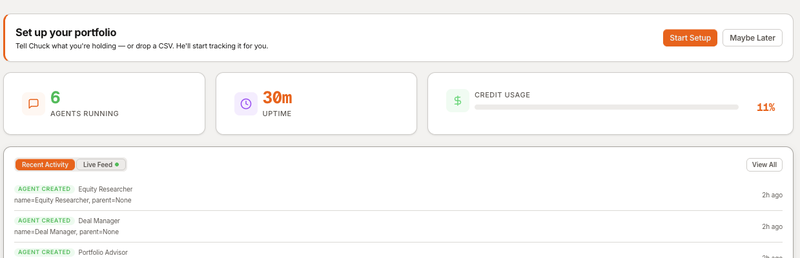
Alternatively, you can go directly to Chuck from the Agents page and say "Set up my portfolio".
How to import
There are three ways to get your portfolio into FinON:
Option 1: Paste in chat
Just tell Bobby or Chuck what you hold:
I own:
- 100 shares of AAPL at $150, bought Jan 2024
- 50 shares of MSFT at $380, bought Mar 2024
- 200 shares of VAS.AX at $92, bought Jun 2023
Chuck will parse it, confirm back with you, and save it.
Option 2: Upload a CSV
Upload a file in the chat — Chuck accepts CSV, Excel (.xlsx), PDF, and JSON. He can read just about anything you throw at him. But here's a clean CSV format if you want to make his life easy:
ticker,shares,cost_basis,date_acquired,account
AAPL,100,150.00,2024-01-15,brokerage
MSFT,50,380.00,2024-03-20,brokerage
VAS.AX,200,92.00,2023-06-10,super
Upload the file in the chat window — Chuck will process it automatically.
Option 3: Type it out
Just say "Set up my portfolio" and Chuck will walk you through it step by step.
What Chuck does with your portfolio
Once your holdings are imported, Chuck can:
| Capability | Example |
|---|---|
| Daily check | "How's my portfolio doing?" — P&L, top movers, drift |
| Rebalancing | "Rebalance to 60/40" — shows current vs target, recommended trades |
| Tax strategy | "EOFY planning" — harvesting opportunities, CGT analysis, franking credits |
| Monitoring | "Alert me if any position drops 5%" — scheduled monitoring via cron |
| Updates | "I bought 50 more AAPL at $195" — updates the book |
| Reports | "Quarterly performance report" — attribution, commentary, outlook |
Updating your portfolio
Your portfolio is a living document. Tell Chuck about changes as they happen:
"I sold all my MSFT""I bought 200 shares of CBA.AX at $115""Update my AAPL cost basis to $160"
Chuck reads the file, applies the change, and writes it back. No manual editing needed.
Tax jurisdiction
Chuck currently operates under Australian tax rules:
- CGT discount — 50% discount for assets held 12+ months
- Franking credits — tracks franked dividends and imputation credits
- EOFY planning — end-of-financial-year tax-loss harvesting and strategy
- SMSF — supports self-managed super fund tax rates
- ATO compliance — anti-avoidance rules and wash sale equivalent checks
Coming soon: US tax rules, UK CGT, and more jurisdictions. We're expanding Chuck's tax knowledge — if you need a specific jurisdiction, let us know at support@finon.ai.
Cross-desk awareness
When your portfolio is set up, the whole desk benefits:
- Wendy (Equity Researcher) — if she's researching a stock you hold, Chuck can provide your cost basis and position size for context
- Bobby — routes portfolio questions directly to Chuck without you specifying
- Mike (Deal Manager) — if a deal target overlaps with your holdings, the desk connects the dots
Privacy
Your portfolio data is stored on your isolated tenant runtime — the same OpenFang instance that runs your agents. It is protected by FinON auth and never touches another user's data.
Next steps
- Agents — learn about the full FinON team
- Getting Started — set up your account